Reports in your client's brand, made in minutes
Followers, reach, engagement and the top posts for one client, on one page carrying the client's own name, logo and colour. Save it as a PDF or share a live link they can open with no login. On Agency, it is emailed to them every week or month.
No card needed · moves to Free after 14 days
During the trial: 300 AI credits, up to 15 accounts and 5 clients.
Publishes to all 11 platforms: LinkedIn, Instagram, Facebook, X, YouTube, TikTok, Pinterest, Threads, Google Business, Bluesky and Mastodon.
Why reporting eats the month's end
Exports from every app
Numbers copied out of each platform into a spreadsheet, then into a slide, for every client.
A report nobody reads
A wall of figures with someone else's logo on it doesn't look like the client's own document.
Sending it, every month
One more job on the first of the month, for each client, by hand.
What a client report includes
One page per client, built from the analytics of the accounts you connected for them, for the date range you choose.
The numbers that matter
Followers, reach, engagement and the client's top posts, without a spreadsheet export.
A PDF with no Optimate branding
Print it or save it as a PDF. It carries the client's name, logo and colour: it is their document.
A live link, no login
Turn on Share this report and the client can open current numbers any time. A new link stops the old one at once.
Emailed on a schedule (Agency)
Weekly on Mondays for the week before, or monthly on the 1st for the month before, with that client's numbers only.
White-label on Agency
A shared link ends with a small Made with Optimate line. On Agency, your agency's logo and name replace it.
Each client sees only theirs
Every report and every email covers one client's accounts, never a summary of your whole workspace.
What your client receives
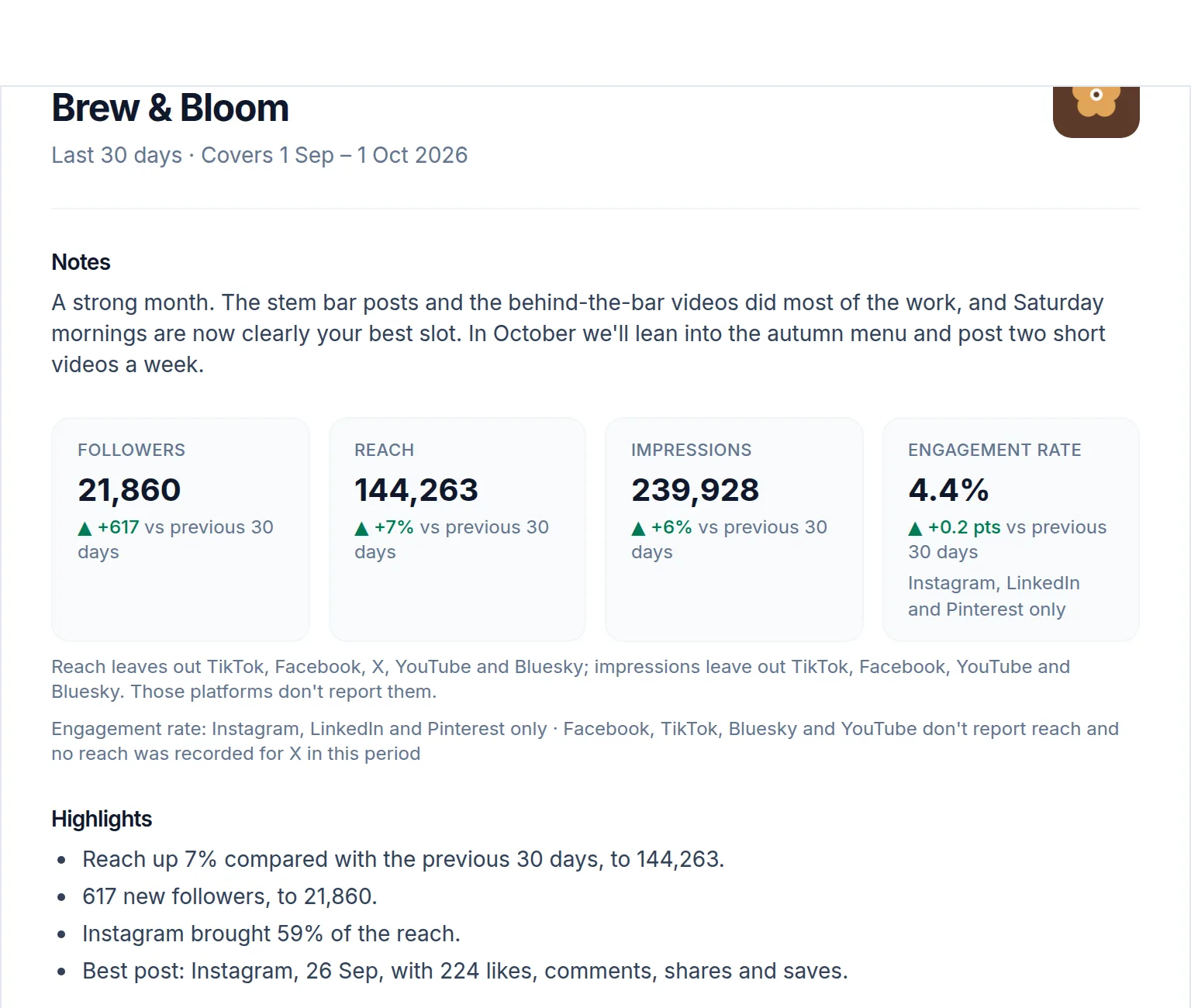
Send a report in a few minutes
- 1
Switch to the client
Open Analytics and choose the date range.
- 2
Open Client report
Save it as a PDF, or turn on Share this report for a live link.
- 3
Or let it send itself
On Agency, choose Weekly or Monthly in the client's Client workflow and add their email.
Common questions
Which plans include client reports?
The report and its live link are on every paid plan and in the free trial, once the client has analytics to show. Emailing it on a schedule, and your own branding on it, are part of Agency, including the Agency trial.
Does my client need an account to see it?
No. The shared link opens without a login, and only editors on your team can switch it on or off.
Can the report carry my agency's branding?
On Agency, yes. Shared report links show your logo and name instead of Optimate's, and scheduled report emails come from your agency's name.
When do scheduled reports go out?
Weekly reports every Monday, covering Monday to Sunday before. Monthly reports on the 1st, covering the whole of the previous month.
Related
Show every client what you did this month
Start with the 14-day free trial, no card needed.